
In this article
You've heard it before: "Work smarter, not harder." When it comes to social media, repurposing content is what that actually looks like in practice. But most people do it wrong — they copy a caption, paste it across three platforms, and call it done. Then they wonder why engagement tanks and their audience starts to tune out.
Real social media repurposing isn't about posting the same thing over and over. It's about taking one strong idea and presenting it in ways that feel fresh, relevant, and native to each platform and moment — without starting from scratch every single time.
This guide walks you through exactly how to do that: the types of content worth repurposing, how to decide what to use, the variation technique that keeps things from feeling repetitive, and how to build a workflow that mostly runs itself inside MeetEdgar.
Repurposing ≠ Copy-Pasting (Here's the Difference)
Here's the most common mistake people make: they write a caption for LinkedIn, then paste that exact caption into Instagram, Facebook, and Twitter. They figure they're "repurposing." But their audience — especially the portion that follows them on multiple platforms — sees the same post four times and starts skimming.
That's not repurposing. That's copy-pasting with extra steps.
Real repurposing means the underlying idea stays the same, but the expression of it changes. You might swap the hook from a question to a bold statement. You might trim a 300-word LinkedIn post down to a punchy 3-line Twitter thread. You might take a stat you buried in paragraph four and lead with it instead. The insight is the same. The experience of reading it is different.
This matters for two reasons. First, not everyone will see every post. Most platform algorithms show a post to a small percentage of your audience — often 5–10% organically. Posting variations of the same content ensures more people encounter your idea, not fewer. Second, the same message can land differently depending on how it's framed. What doesn't resonate as a rhetorical question might land much better as a counterintuitive statement.
The goal of social media repurposing is to multiply your reach without multiplying your creative effort. Copy-pasting does neither.
What Types of Content Are Worth Repurposing?
Not everything in your archive deserves a second (or third) life. The most effective social media repurposing starts with choosing the right source material. Here's what to look for:
Evergreen Content
Evergreen content stays relevant long after it's published — it's not tied to a trend, a news story, or a season. Tips, how-to guides, frameworks, and foundational explanations all qualify. If someone could find value in a piece of content a year from now, it's a strong repurposing candidate.
Check out these 5 easy ways to repurpose content if you want specific examples of how evergreen material can be stretched across formats and platforms.
High-Performing Posts
Pull up your analytics and look for posts that drove strong engagement, saves, clicks, or shares. These are your "bets on winners" — content that already proved it resonates with your audience. If it worked once, a variation of it is likely to work again, especially for followers who didn't see it the first time around.
Thought Leadership and Authority Content
If you've shared a hot take, a contrarian perspective, or a piece of original thinking that defines your point of view, that content deserves repeated airtime. Your audience's understanding of who you are is built on consistent exposure to your most distinctive ideas — not just your latest ones.
Series and Pillar Content
Long-form content — comprehensive blog posts, podcast episodes, webinars, in-depth guides — is the richest source for repurposing. You can turn a single blog post into 10 fresh pieces of content or more by pulling out individual points, stats, quotes, and frameworks and giving each one its own post.
What to avoid:
Anything time-sensitive (event announcements, trending news, seasonal content). If context has shifted since you wrote it, repurposing it without updating the core message can mislead or confuse your audience.
How to Repurpose Content for Social Media in Simple Steps
Knowing what to repurpose is only half the equation. The other half is knowing how to actually do it without spending hours reformatting and rewriting. Here's a straightforward process for repurposing content for social media — one that works whether you're starting with a blog post, a podcast, a video, or a newsletter.
Step 1: Pick your source content. Start with one piece of long-form content that performed well or contains ideas you want more people to see. A blog post, a webinar recording, or a podcast episode works great as a starting point.
Step 2: Break it into standalone ideas. Read through the content and highlight 3–5 individual insights, tips, or points that can stand alone — without needing the full context of the original piece. Each one of these becomes the foundation for a separate social media post.
Step 3: Match the idea to a format. For each idea, decide which format makes the most sense for the platform you're posting on:
- A single strong tip → a punchy text post for LinkedIn or Twitter/X
- A numbered list → a carousel for Instagram or LinkedIn
- A how-to process → a short video or Reel
- A quote or stat → a branded graphic for Instagram or Pinterest
Step 4: Write the caption and choose your hook. This is where the variation technique comes in (more on that in the next section). Write at least two or three different opening lines for each post — you'll use them as variations over time.
Step 5: Schedule and recycle. Add the post to a social media scheduling tool like MeetEdgar with all its variations. Set a content category and scheduling time to get it published automatically.
The Variation Technique: How to Repurpose Without Repeating
This is the part most guides skip, and it's where the real magic happens. The variation technique is simple: take one core piece of content and produce multiple versions of it by changing one variable at a time. You're not rewriting the whole thing — you're tweaking the entry point.
There are three main levers to pull:
Change the Hook
The hook is the opening line — the thing that determines whether someone stops scrolling or keeps going. The same insight can be introduced in dramatically different ways:
- Question hook: "Are you really repurposing content — or just copy-pasting it?"
- Statement hook: "Reposting the same caption everywhere is killing your engagement."
- Data hook: "Only 5–10% of your audience sees each post organically. Here's how to fix that."
- Story hook: "Last year, I wrote the same post four times and got four different results. Here's what changed."
All four of these could introduce the exact same content. Each one will perform differently with different segments of your audience.
Change the Format
The same core idea can take on completely different shapes depending on the platform and medium:
- A key insight from a blog post → a single punchy tweet
- A numbered list from a podcast episode → a LinkedIn carousel
- A how-to guide → a short-form video walkthrough
- A data point → a branded quote graphic
Format changes are the most obvious form of repurposing, and they're effective — but don't stop there.
Change the Audience Angle
Who are you speaking to? The same tip applies to different people in different ways. "How to repurpose content" looks different for a solopreneur with limited time versus a content team trying to scale output. You can address those angles explicitly:
- Beginner angle: "If you're just starting out on social media, here's the simplest way to repurpose your content..."
- Time-pressed angle: "If you only have 20 minutes a week for content, this is what I'd focus on..."
- Scale angle: "Once you have a library of 50+ posts, here's how to keep it from going stale..."
Each variation speaks to a different reader, even though the underlying advice is the same. None of them feel repetitive.
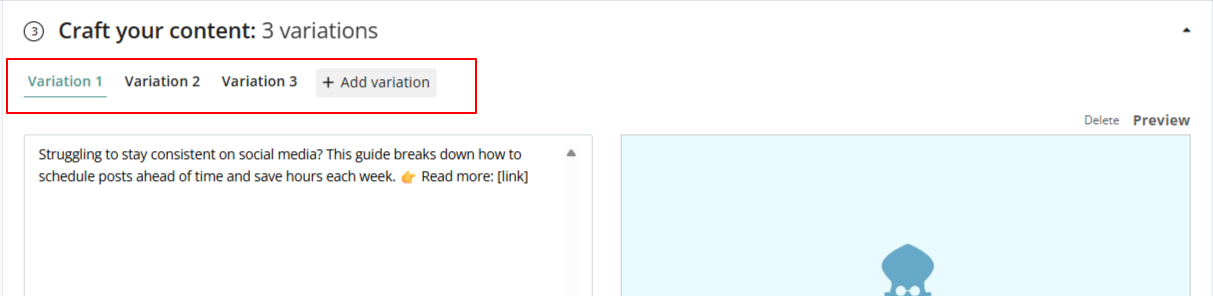
This is exactly what MeetEdgar's Variations feature was built for. When you add a post to your MeetEdgar content library, you can write multiple variations of that post directly inside the composer. Instead of creating one version, you create multiples at once— each with a different hook, angle, or framing.
Building Your Repurposing Workflow with MeetEdgar
Once you understand the variation technique, the practical question is: how do you turn this into a sustainable workflow? Here's a simple 4-step system that works inside MeetEdgar.
Step 1 — Add Content to Your Library
Every time you publish something — a blog post, a podcast, a video, a newsletter — pull out the strongest 3–5 ideas from it and add them to your MeetEdgar library as individual posts. Don't worry about writing perfect captions right away. Get the ideas in.
MeetEdgar also supports RSS auto-import, so if your blog has an RSS feed, you can connect it and have Edgar automatically pull in new posts as they're published.
Step 2 — Create Variations
Once a post is in your library, write 3–5 variations using the variation technique described above. Aim for at least one hook swap (question, statement, story), one format adjustment for the platform, and ideally one audience-angle shift. MeetEdgar's content composer shows all your variations in one view so you can see them side by side.
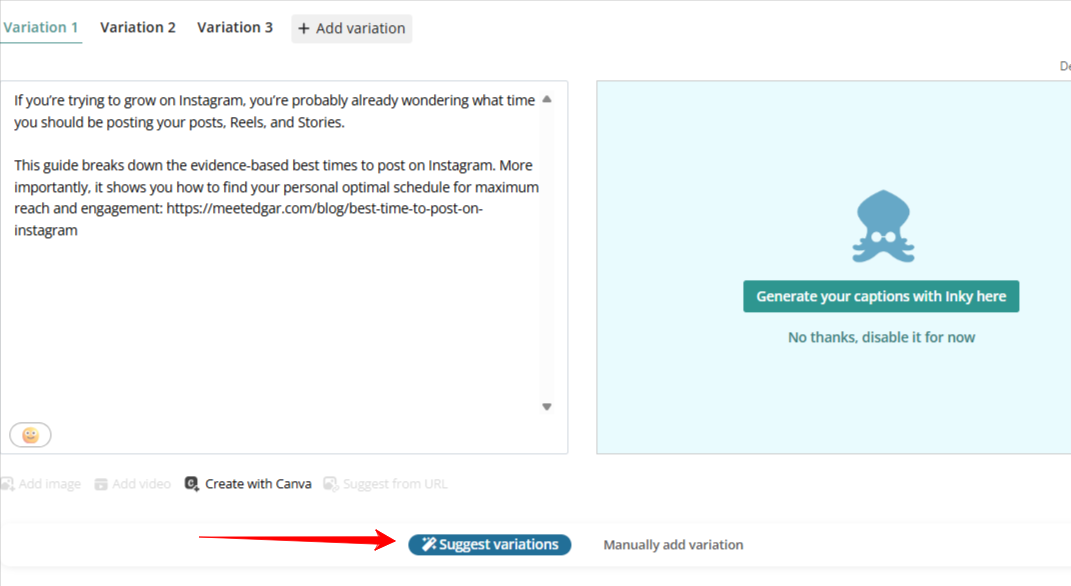
To speed this up, you can also use a link to suggest variations automatically or Inky, the AI caption generator by pasting in your original caption, select a tone or format, and let the AI generate a variation you can edit and refine.
Step 3 — Organize by Category
MeetEdgar lets you organize posts into content categories (e.g., "Tips," "Client Stories," "Behind the Scenes," "Promotions"). Categorizing your repurposed content ensures a healthy mix in your feed — you won't end up with five promotional posts in a row because Edgar pulls from each category in rotation.
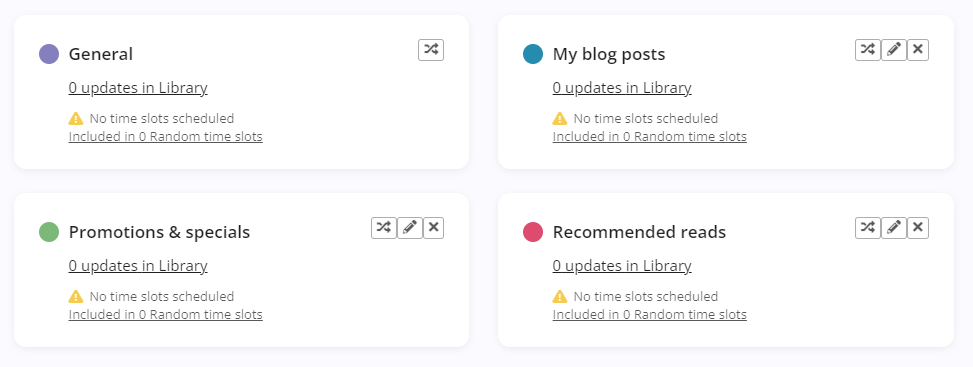
This is also how you balance repurposed and new content. You might have a "Blog Repurpose" category that runs twice a week alongside a "Fresh Content" category that runs three times a week.
Step 4 — Schedule and Recycle
Once your library is set up and categorized, MeetEdgar's automated scheduling takes over. You define the time slots; Edgar fills them with the right content from the right category. When your queue runs low, Edgar automatically cycles back to older posts from your library — using the next variation in the sequence, so it never re-posts the same caption twice.

The result is a consistent social media presence that keeps running even when you're not actively creating new content. You get off the content creation treadmill — and your existing content keeps working for you.
Ready to put your content to work? Start your free trial of MeetEdgar and see how much further your existing content can go.