
In this article
Facebook Stories disappear after 24 hours — but the impact they leave on your audience doesn't have to. With over 500 million people viewing Stories across Facebook every day and accounting for 31.7% of all time spent on Facebook, this fast-moving format has become one of the most underutilized tools in a brand's social media toolkit.
For brands, that matters. Facebook Stories still offer premium placement at the top of the app, a full-screen mobile format, and a low-friction way to share timely, engaging content.
Whether you're a business or a personal brand, mastering Facebook Stories can help you stay top-of-mind, drive traffic, and build a more authentic connection with your audience. This guide covers everything you need to know to make Stories work for your brand.
What Are Facebook Stories?
Facebook Stories are short, user-generated collections of photos, videos, text, or GIFs that stay visible for 24 hours before disappearing. They offer a raw, immediate, and often more personal glimpse into a brand’s or individual’s daily activities, promotions, or behind-the-scenes moments.
These Stories appear prominently at the top of users’ News Feeds on both desktop and mobile, as well as within the Messenger app, which gives them strong visibility.
Unlike regular feed posts, Stories create a sense of urgency. Viewers know the content will not be around forever, which makes them more likely to engage right away.
Why Facebook Stories Matter for Brands
Facebook Stories give brands a chance to show up in a premium position inside the app while publishing content that feels immediate and approachable. That matters whether you run a company page, manage a local service business, build an ecommerce brand, or grow a personal brand around your expertise.
Increased Visibility
Stories occupy prime real estate at the very top of the Facebook News Feed, making them one of the first things users see when they open the app. This prominent placement helps your content stand out, even in a crowded feed.
Enhanced Engagement
The interactive nature of Stories, with features like polls, quizzes, and question stickers, encourages direct audience participation. This not only boosts engagement metrics but also gives you valuable insight into your audience’s preferences and opinions.
Authenticity and Humanization
Unlike highly polished feed posts, Stories give brands the opportunity to show a more authentic, less curated side. This helps humanize your brand and makes it feel more relatable and trustworthy.
Driving Action and Conversions
Facebook Stories include strong call-to-action options, including swipe-up links for eligible Pages and action buttons like “Shop Now,” “Learn More,” or “Book Now.” These features can help drive traffic to your website, generate leads, and increase conversions.
Facebook Stories Specs (2026)
To make sure your Stories look professional and perform well, follow these recommended specifications:
- Aspect ratio: 9:16 (vertical)
- Recommended resolution: 1080 x 1920 px
- Photo duration: 5 seconds
- Video length: Up to 20 seconds per clip
- File types: MP4, MOV (video); JPG, PNG (photo)
- Safe zone: Keep important content within the center 1080 x 1420 px to avoid cropping by interface elements
How to Post a Facebook Story
Posting a Facebook Story is straightforward, but consistency is where many brands fall short.
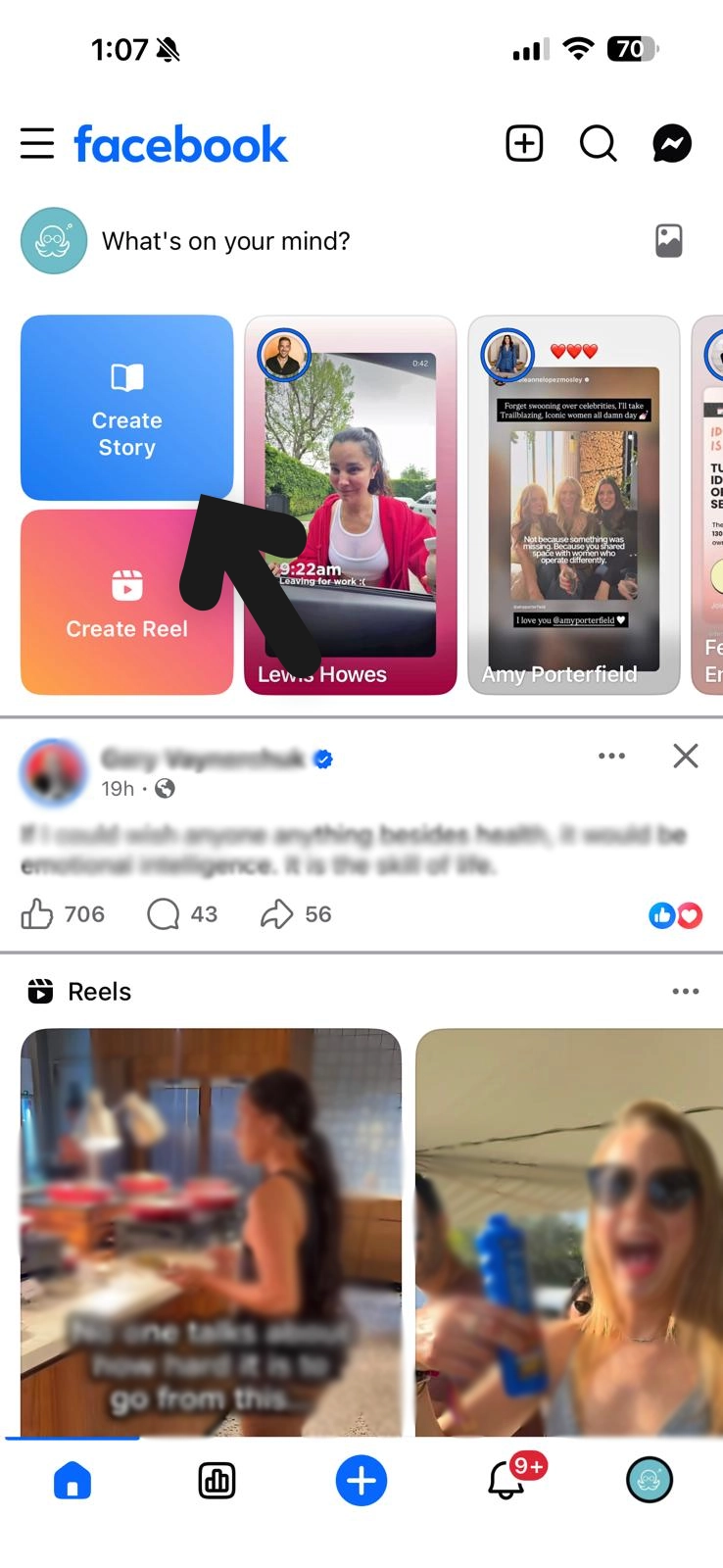
1. Open the Facebook app and tap Create Story at the top of your feed or profile.
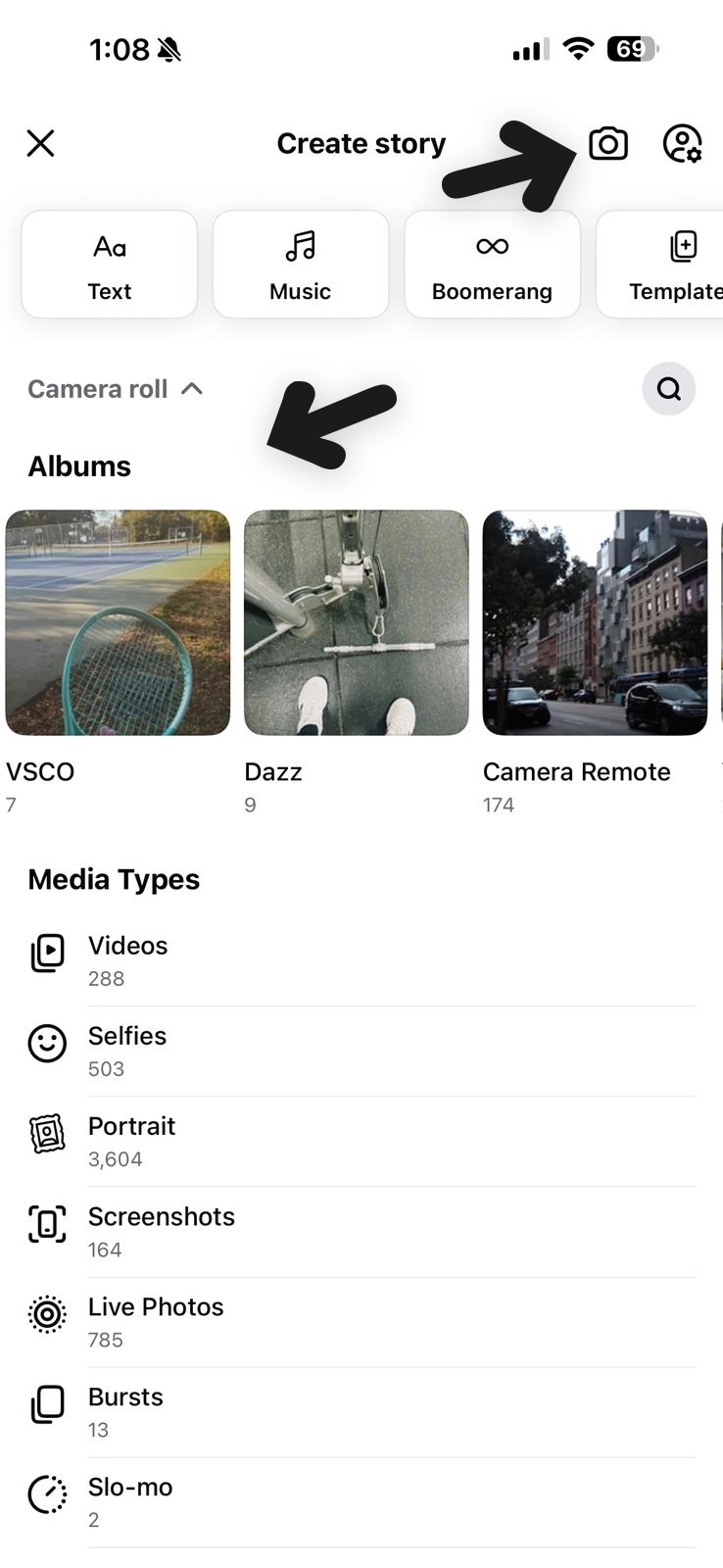
2. Choose a photo, video, boomerang, or use the camera icon to take a new photo or record a video.
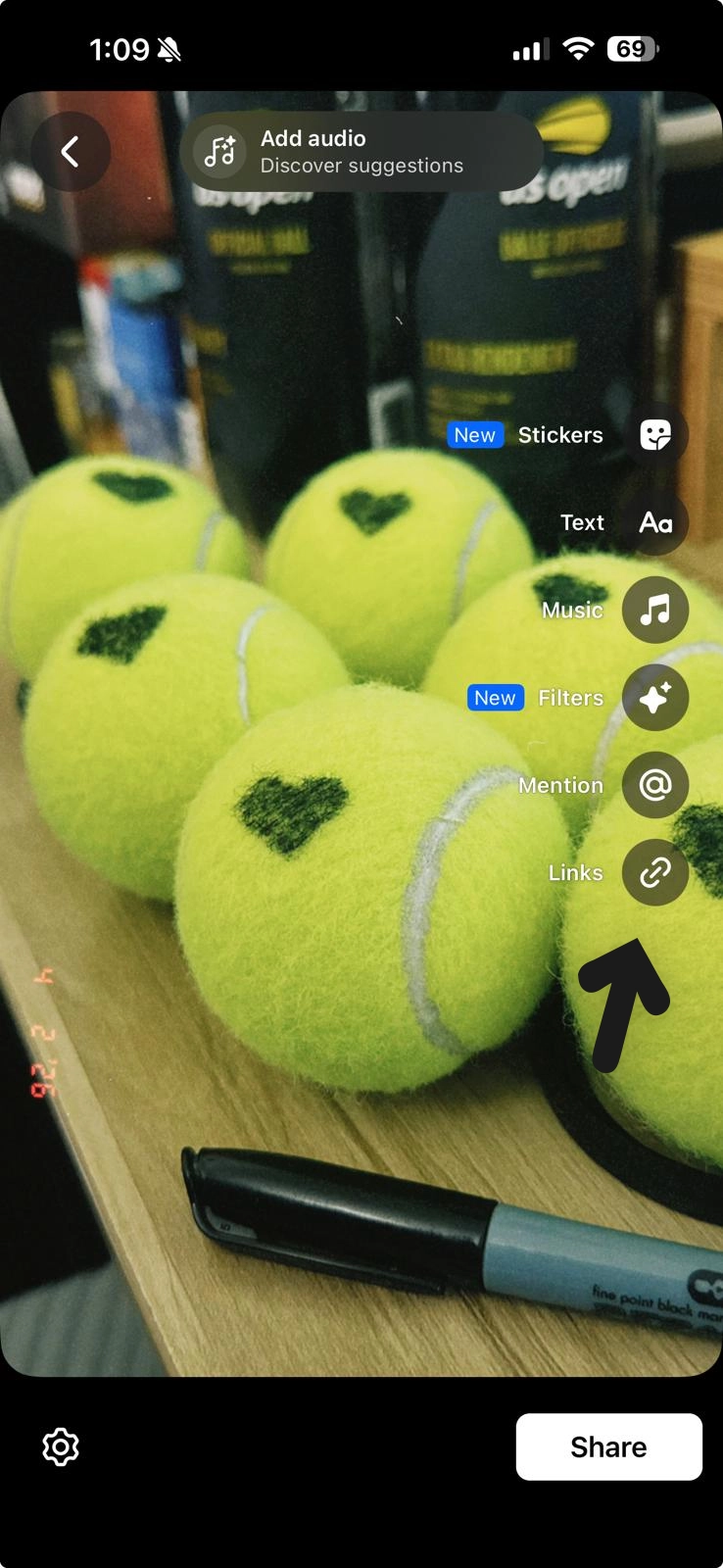
3. After uploading your media, edit your Story by adding text, stickers, polls, music, or links.
4. Adjust your privacy settings to Public, Friends, or Custom by clicking the gear icon at the bottom left.
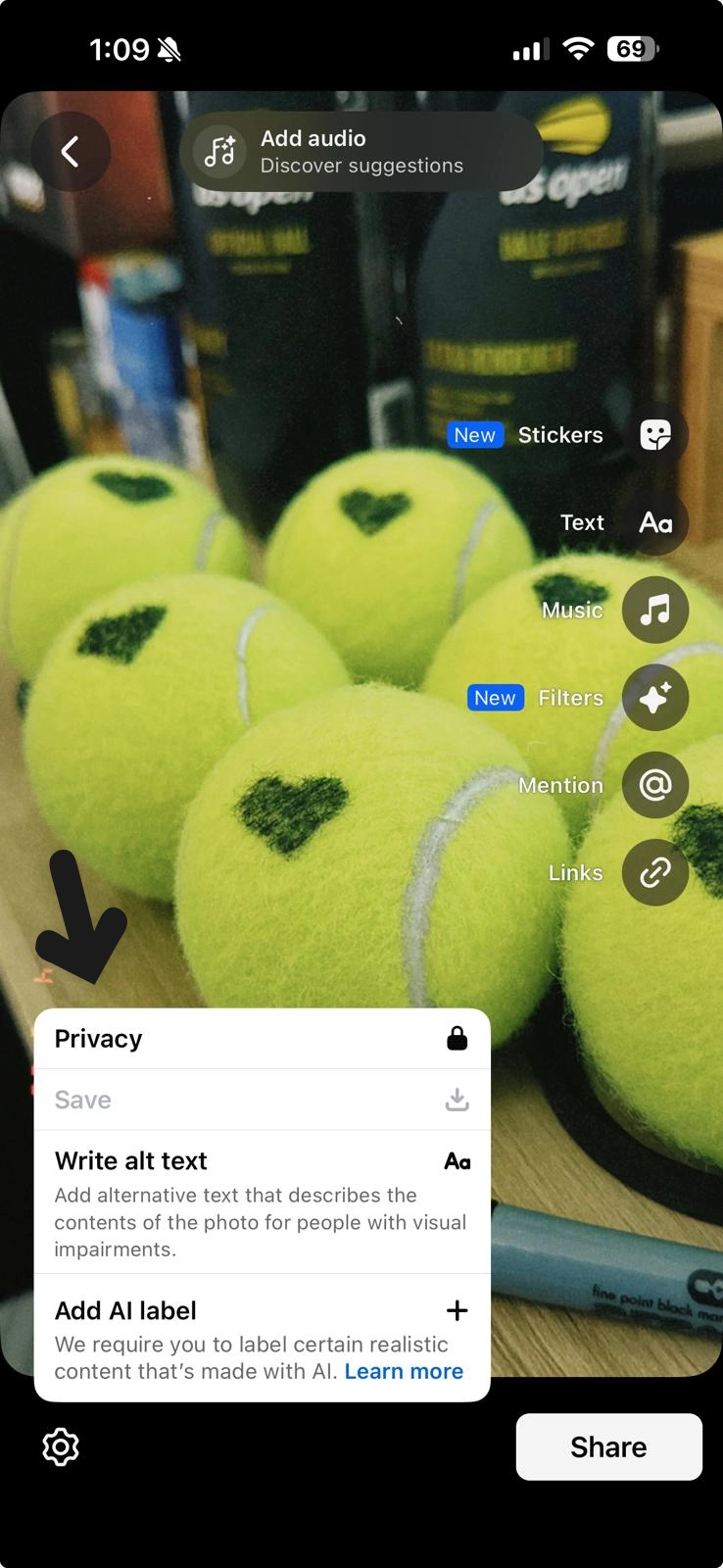
5. When you are ready, tap Share to publish your Facebook Story.
If you're managing a business Page, you can also create Stories directly through Meta Business Suite via Desktop.
However, posting manually every day is where most brands hit a wall. Life gets busy, content ideas run dry, and before you know it, you've gone two weeks without a single Story. The fix is building a system around it — batching your content in advance and letting a scheduler handle the rest. If you're not sure where to start, our guide on how to schedule Facebook Stories walks through exactly how to build that workflow so your brand stays consistent without the daily scramble.
Facebook Stories vs. Instagram Stories: Which Should You Prioritize?
Facebook Stories and Instagram Stories share a nearly identical format, and content often cross-posts seamlessly between the two platforms.
The biggest difference is audience demographics. Facebook tends to skew slightly older, especially among users aged 25 to 54, while Instagram generally trends younger.
For most brands, the smartest approach is to create once and publish to both platforms. This helps you stretch your content investment further and maintain a stronger cross-platform strategy.
MeetEdgar’s scheduling features make this easier by helping you plan your Stories content calendar across networks without doubling your workload.
How Brands Can Use Facebook Stories
One reason brands struggle with Stories is that they assume every post needs to be highly produced. It does not. In fact, some of the best-performing Story content feels simple, timely, and current.
Here are practical Facebook Story formats that work well for both business and personal brands:
- Behind-the-Scenes: Show your workspace, creative process, or daily routine.
- Quick Tips: Share a single actionable tip related to your niche.
- Product Highlights: Showcase a new product or service and include a direct link when possible.
- Polls and Questions: Use interactive stickers to boost engagement and gather audience insights.
- User-Generated Content: Reshare customer photos, testimonials, or tagged posts.
- Countdowns: Build anticipation for a launch, event, or sale.
- Blog or Content Teasers: Drive traffic by previewing your latest blog post, video, or resource.
- Day-in-the-Life: This format works especially well for personal brands.
- Milestones and Wins: Celebrate anniversaries, follower growth, press mentions, or other achievements.
- Repurposed Content: Turn a tweet, quote, or carousel slide into a quick Story card.
Best Practices for High-Performing Facebook Stories
If you want your Facebook Stories strategy to drive real brand value, follow these best practices:
Design for Mobile First
Always create content in a vertical format. Use bold, readable fonts and high-contrast colors, since many viewers watch without sound. Add captions to video content to improve accessibility and clarity.
Post Consistently
The brands that win with Stories are not always the most creative. They are often the most consistent. Aim for 3 to 5 Stories per day to stay visible at the top of your followers’ feeds.
This is where scheduling tools like MeetEdgar can help, allowing you to queue up Story content in batches so you are not scrambling every day.
Use Interactive Elements
Polls, question boxes, quizzes, and emoji sliders are not just fun. They also encourage engagement and give you direct feedback from your audience.
Hook Viewers in the First Frame
You only have a fraction of a second before someone taps through. Start with a bold visual, an intriguing question, or a strong statement. Do not save the best part for later.
Track Your Metrics
Monitor reach, impressions, tap-forwards, tap-backs, and exits inside Facebook Insights. Tap-backs can signal that your content resonated, while early exits may show where viewers are losing interest.
Cross-Promote Your Stories
Do not limit your Stories to Facebook alone. Share them across other social media platforms to maximize reach and drive more traffic back to your Facebook presence.
Facebook Stories give brands a powerful way to stay visible, increase engagement, and show a more authentic side of their business. Because they are quick to create and easy to consume, they are a valuable format for both business and personal brands.
Frequently Asked Questions About Facebook Stories
How long do Facebook Stories last?
Facebook Stories usually remain visible for 24 hours before disappearing, unless the content is saved or repurposed elsewhere by the account owner. This limited lifespan is part of what makes Stories feel timely and encourages faster engagement.
Who can see my Facebook Story?
That depends on your privacy settings. You can share Stories publicly, with friends only, or with a custom audience. Business Pages default to public visibility, which is ideal for brand reach.
Can you schedule Facebook Stories?
Yes, brands can use Meta Business Suite to schedule Facebook Stories or using a social media management tool, like MeetEdgar to schedule stories ahead and cross-promote content in other social media platforms. Check out our full guide on how to schedule Facebook Stories for a step-by-step walkthrough.
Can I share the same Story to Facebook and Instagram?
Yes. Facebook gives you the option to cross-post Stories to Instagram simultaneously. But should you? In many cases, yes. Meta has described cross-posting opportunities between Instagram and Facebook for some story-based branded content, and for brands, reusing Story content across both platforms can be an efficient way to extend reach and get more value from the same creative asset.
Can I add a link to my Facebook Story?
Yes. Business Pages and eligible profiles can add a link sticker to Stories, making it easy to drive traffic directly to a product page, blog post, or landing page.
How do you delete a Facebook Story?
To delete a Facebook Story, open your Story on Facebook, tap the three dots in the top corner, and select Delete Photo or Delete Video. Once deleted, the Story will no longer be visible to your audience.
What is the difference between Facebook Stories and feed posts?
Facebook Stories are temporary, mobile-first, and designed for quick engagement, while feed posts are more permanent and often better suited for evergreen or detailed content.