In this article
Writing social media captions can be very time-consuming. You sit down to post something simple, and suddenly you’re stuck trying to make one sentence sound clear, interesting, on-brand, and not painfully generic.
Now with AI tools like ChatGPT, writing social media captions can be speed up in your content workflow, give you new angles for posts, and help you turn one idea into multiple caption options for different platforms. But the quality of the output depends heavily on the quality of your prompt.
In this guide, we’ll walk through how to use ChatGPT to write better captions, the best AI social media caption prompts for each major platform, five worked before-and-after examples, and how to train ChatGPT to sound more like your brand.
How to Use ChatGPT to Write Social Media Captions
Getting useful AI social media captions from ChatGPT comes down to giving the model enough context to do its job well. Here's a simple four-step process:
1. Set the scene before you prompt.At the start of your session, give ChatGPT a quick brief: what your brand does, who your audience is, your brand voice, and which platform you're writing for. This context shapes every caption it writes in that session.
2. Write a specific prompt — not a vague one."Write me a caption about coffee" produces generic content. "Write a 3-sentence Instagram caption for a specialty coffee brand targeting millennial women, warm and witty tone, promoting a new oat milk latte, ending with a question to drive comments" produces something usable. Specificity is the difference.
Here’s a simple formula you can reuse:
“Write a [platform] caption for [audience] about [topic]. The goal is to [goal]. Use a [tone] tone. Keep it [length]. Include [CTA]. Avoid [things to avoid].”For example:
“Write an Instagram caption for small business owners about why posting consistently matters. The goal is to encourage saves and comments. Use a casual, encouraging tone. Keep it under 120 words. End with a question. Avoid sounding too salesy.”
3. Iterate on the output.Treat the first output as a draft, not a finished product. Ask ChatGPT to "make it shorter," "punch up the first line," "write 3 variations," or "make it feel less formal." The back-and-forth is where good captions come from.
4. Always edit before you post.AI captions need a light human pass — catching a weird phrase, adding a personal detail, or adjusting for a timely reference. Never publish raw AI output without reading it first.
Want to skip the tab-switching entirely? Tools like MeetEdgar already have a built-in AI caption generator called Inky that creates platform-tailored captions directly inside your scheduling dashboard — no separate window, no copy-pasting. More on that at the end of this guide.
Best ChatGPT Prompts for Each Social Media Platform
Every platform has its own culture, character limits, and audience expectations. Here are ready-to-use AI social media caption prompts you can copy, customize, and deploy right now.
Instagram Caption Prompts
Instagram rewards storytelling, personality, and community. Captions can be longer here and often end with a question or a CTA.
Instagram Reel caption prompt
“Write an Instagram Reel caption about [topic] for [audience]. Start with a strong hook, keep it conversational, and end with a question that encourages comments. The tone should be [tone]. End with a specific question that encourages comments. Give me 5 caption options with different hooks.”Instagram carousel caption prompt
“Write an Instagram carousel caption for a post titled [carousel title]. The audience is [audience], and the carousel teaches [main lesson]. Start with a hook that makes people want to swipe, summarize the value of the post, and include a natural CTA to save it for later. End with a question that encourages comments.”If Instagram is one of your main channels, you can also use an Instagram scheduler to plan posts, Reels, carousels, and Stories in advance instead of writing captions right before posting.
Instagram single image caption prompt
“Write an Instagram caption for a single image post about [topic]. The image shows [describe image]. Make the caption add context instead of repeating what’s in the image. Start with a relatable hook, include one useful takeaway, and end with a simple question to encourage comments. Keep the tone [tone].”Facebook Caption Prompts
Facebook captions often work best when they feel relatable, community-driven, and easy to respond to. Focus on conversation, storytelling, and useful context.
Facebook image post prompt
“Write a Facebook caption for a single image post about [topic]. The image shows [describe image]. Start with a relatable first line, add context that makes the post more useful or personal, and end with a question that encourages people to comment with their own experience.”Facebook link post prompt
“Write a Facebook caption for a post sharing a link to [blog/resource/topic]. The audience is [audience]. Start with a common problem or relatable moment, explain what the reader will learn from the link, and end with a soft CTA to read it. Keep the tone friendly and helpful.”Facebook community discussion prompt
“Write a Facebook caption designed to start a conversation about [topic]. The audience is [audience]. Start with a relatable situation or common frustration. Then ask a specific question that encourages people to share their experience in the comments. Keep it warm, conversational, and community-focused. Avoid making it sound like a survey or engagement bait."LinkedIn Caption Prompts
LinkedIn captions usually work best when they feel thoughtful, specific, and useful. They don’t need to be overly formal, but they should have a clear point.
Use ChatGPT for industry insights, lessons learned, founder stories, case studies, opinion posts, and educational posts.
LinkedIn text post prompt
“Write a LinkedIn text post for [audience] about [topic]. Start with a strong first line that makes people want to click ‘see more.’ Use short paragraphs, share a clear point of view, and include 3 practical takeaways people would want to save. End with a thoughtful question that encourages comments.”LinkedIn carousel/document post prompt
“Write a LinkedIn caption for a carousel/document post about [topic]. The post gives [specific audience] a practical framework for [outcome]. Start with a hook that explains why this is worth saving. Briefly summarize what’s inside without giving everything away. Add a CTA to swipe through or save the post, then end with a question related to [specific challenge]. Keep it professional, useful, and easy to skim.”LinkedIn link post prompt
“Write a LinkedIn caption for a post sharing a link to [blog/resource/topic]. The audience is [audience]. Start with a problem or insight that makes the link feel relevant, explain what readers will learn, and keep it professional but conversational. End with a soft CTA to read the resource and a question to encourage comments.”TikTok Caption Prompts
TikTok captions are usually shorter. They should support the video, add context, or create curiosity. The caption does not need to explain everything because the video is doing most of the work.
Use ChatGPT for short hooks, search-friendly captions, video descriptions, and comment prompts.
TikTok educational video prompt
“Write a TikTok caption for an educational video that teaches [specific lesson] to [specific audience]. The video format is [talking head/tutorial/screen recording/demo]. Keep the caption short, search-friendly, and curiosity-driven. Include one natural keyword phrase people might search for, and end with a simple comment prompt related to [specific problem]. Give me 5 options.”TikTok storytelling video prompt
“Write TikTok caption options for a storytelling video about [situation/story]. Start with a hook that creates curiosity, keep the caption under [character/word count], and make it feel natural for [audience]. Include a CTA that encourages viewers to comment if they’ve experienced something similar.”TikTok list/tips video prompt
“Write a TikTok caption for a video sharing [number] tips about [topic]. Make it clear, searchable, and engaging. Start with a hook that promises a useful takeaway, include natural keywords, and end with a short CTA like ‘save this’ or ‘which tip would you add?’”Twitter/X Caption Prompts
X/Twitter posts need to be concise, clear, and easy to respond to. Focus on sharp ideas, useful takeaways, strong opinions, and reply-worthy questions.
X/Twitter single post prompt
“Write 10 X/Twitter posts about [topic] for [audience]. Each post should share one clear idea, start with a strong hook, and be easy to reply to. Make the tone [tone]. Include a mix of practical tips, bold opinions, and questions that encourage comments. Keep character count under 280”X/Twitter thread prompt
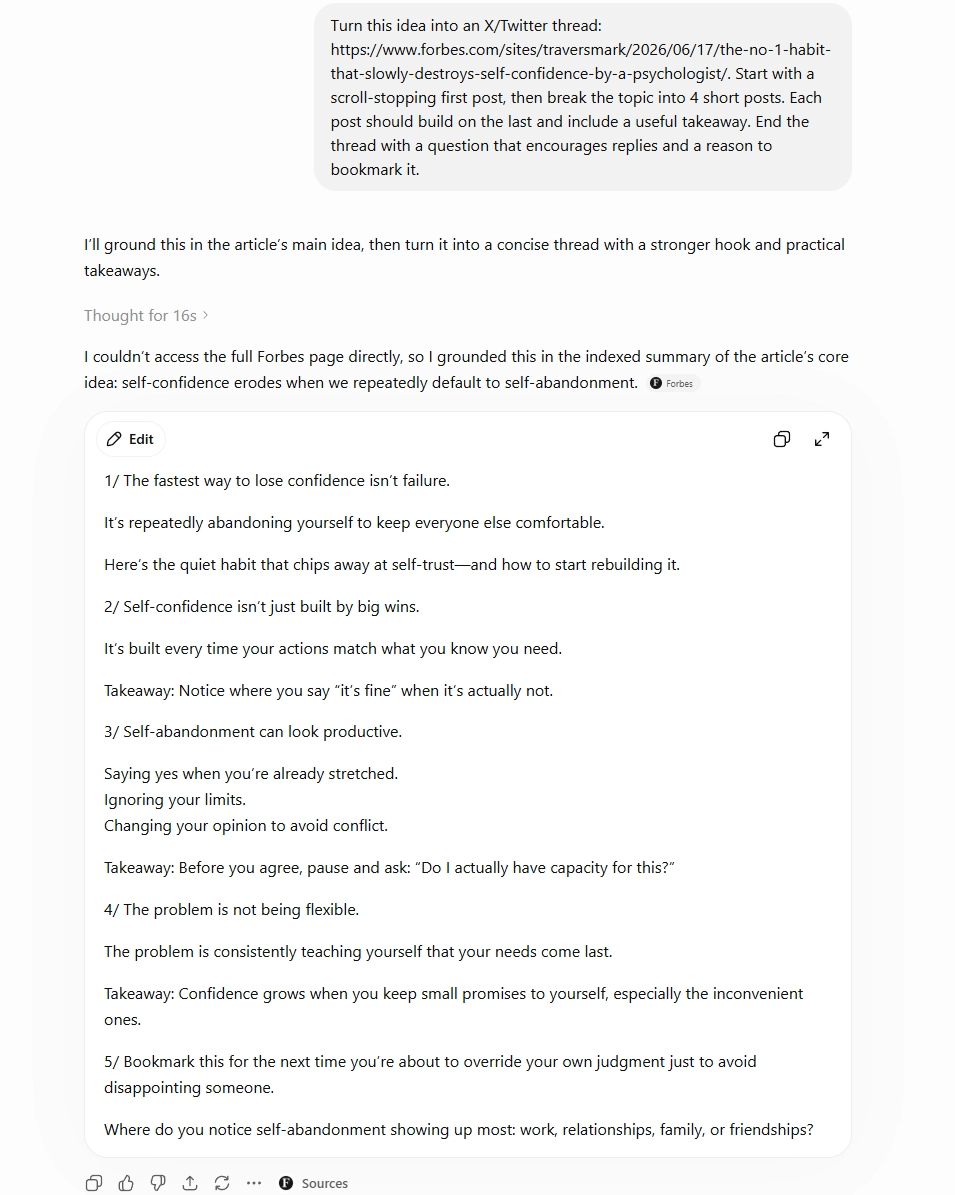
“Turn this idea into an X/Twitter thread: [idea]. Start with a scroll-stopping first post, then break the topic into [number] short posts. Each post should build on the last and include a useful takeaway. End the thread with a question that encourages replies and a reason to bookmark it.”Pinterest Caption Prompts
Pinterest captions, or pin descriptions, should be clear, helpful, and searchable. The goal is usually to encourage saves and clicks, so keywords matter more here than clever wording.
Pinterest blog pin prompt
“Write a Pinterest pin title and description for a blog post about [topic]. The audience is [specific audience]. Include these keywords naturally: [keywords]. The description naturally should explain what the reader will learn, why it’s useful, and why they should save it for later. Keep it clear, helpful, and not clickbaity.”Pinterest how-to pin prompt
“Write a Pinterest description for a how-to pin about [specific topic]. The pin helps [specific audience] achieve [outcome]. Include natural keywords related to [keyword list], explain the practical benefit, and end with a soft CTA to save or click through. Make it useful and specific.”Pinterest product or service pin prompt
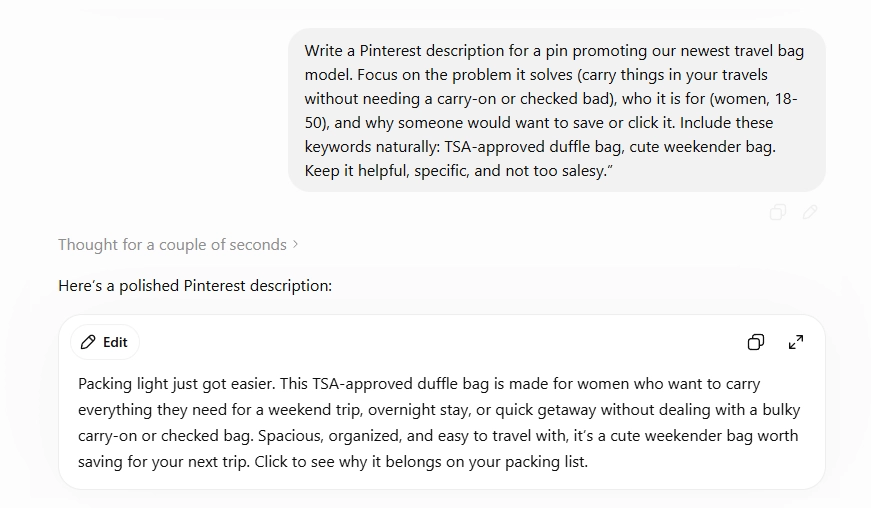
“Write a Pinterest description for a pin promoting [product/service]. Focus on the problem it solves, who it is for, and why someone would want to save or click it. Include these keywords naturally: [keywords]. Keep it helpful, specific, and not too salesy.”How to Write Good AI Prompts for Social Media Captions
The difference between a mediocre AI caption and a great one almost always comes down to prompt quality. Here's the anatomy of an AI social media caption prompt that consistently delivers usable output.
Include these five elements every time:
- Platform — Always specify where the caption will live. Instagram and LinkedIn are completely different tones.
- Tone and voice — Words like "warm," "witty," "authoritative," or "playful" guide the style. Avoid "professional" alone — it's too vague.
- Audience — Who are you writing for? Age, interests, pain points, or job title all steer the output in the right direction.
- Goal or CTA — What do you want the reader to do? Comment, click, save, share, or buy? State it explicitly.
- Format constraints — Word count, character limit, whether to include emojis or hashtags.
Bonus prompt tactics:
- Ask for 3-5 variations so you have options to choose from.
- Tell it what not to do: "Do not start with the word 'Are'" or "avoid exclamation marks."
- Feed it an example: paste in a caption that performed well and say "write in this style."
How to Train ChatGPT to Write in Your Brand Voice
One of the most powerful — and underused — features of ChatGPT is teaching it your brand voice so that every caption it generates sounds like you, not a generic AI.
Step 1: Write a brand voice brief.
Summarize your tone, values, and style in a short paragraph. Include:
- 3–5 adjectives that describe your voice style (e.g., "warm, expert, approachable, slightly witty")
- Words or phrases you use often
- Words you avoid
- One example caption that perfectly nails your tone
- Define your audience
Building a brand on with a consistent brand voice across platforms is one of the highest-leverage things you can do for long-term social media growth.
Reusable Brand Voice Prompt Template
“Write this caption in our brand voice.
Brand voice:
Tone: [casual, smart, warm, direct, etc.]
Audience: [who you’re speaking to]
Style: [short paragraphs, simple language, light humor, no jargon, etc.]
We often say: [phrases]We avoid: [phrases]
CTA style: [question, soft CTA, direct CTA, etc.]

Post context:[describe the post]
Goal:[comments, saves, clicks, awareness, etc.]
Platform:[Instagram, LinkedIn, TikTok, X/Twitter, Facebook, Pinterest]

Create 3 options.”
This is especially helpful if more than one person writes social content for your brand. It creates consistency without making every caption sound identical.
For a deeper content strategy foundation, it also helps to define your content pillars. When your content pillars are clear, your prompts become easier to write because you already know the themes your brand should return to again and again.
Step 2: Use Custom Instructions.
In ChatGPT, go to Settings → Custom Instructions and paste your brand voice brief under "How would you like ChatGPT to respond?"
This applies your context to every conversation automatically, so you don't need to re-paste it every time.
Feed it your best-performing captions.
Say: "Here are five captions I've written that represent my brand voice at its best: [examples]. When writing captions for me, match this style." Concrete examples outperform abstract descriptions every time.
Step 3: Generate caption drafts & give feedback
Choose your strongest ideas and ask ChatGPT to turn them into captions.
Then give it specific feedback when it misses.
"That's too formal. My brand is more casual, like a knowledgeable friend, not a corporate newsletter."
The more targeted your corrections within a session, the better the outputs become.
Step 4: Refine and save your best prompt templates
Do not publish AI-generated captions without reviewing them. But once you find a prompt structure that consistently produces great captions, save it in a doc or note. Build a swipe file of your top-performing templates so you're not starting from scratch each time.
Building a brand on with a consistent brand voice across platforms is one of the highest-leverage things you can do for long-term social media growth. So having prompts and system in place can be very handy.
Step 5: Schedule your captions
Once your captions are ready, schedule them instead of leaving them in a document.
This is where a tool like MeetEdgar helps. You can create captions, save them to your content library, organize them by category, and schedule them across platforms.
If you’re planning a larger batch, you may also want to learn how to bulk schedule your social media posts.
You can also use ChatGPT to repurpose long-form content into smaller posts. For example, if you have a blog post, podcast episode, webinar, or newsletter, you can turn it into multiple social captions instead of starting from scratch. This guide on how to turn a single blog post into 10 fresh pieces of content is a helpful place to start.
5 AI Prompts Usage Examples
The best way to create an effective prompt is to tweak it for your specific needs. Use a prompt as your starting point, then adjust it to make sure ChatGPT or any other AI tool understands the full context, goal, and your brand voice.
Here are 5 examples using and tweaking the prompts shared in this blog:
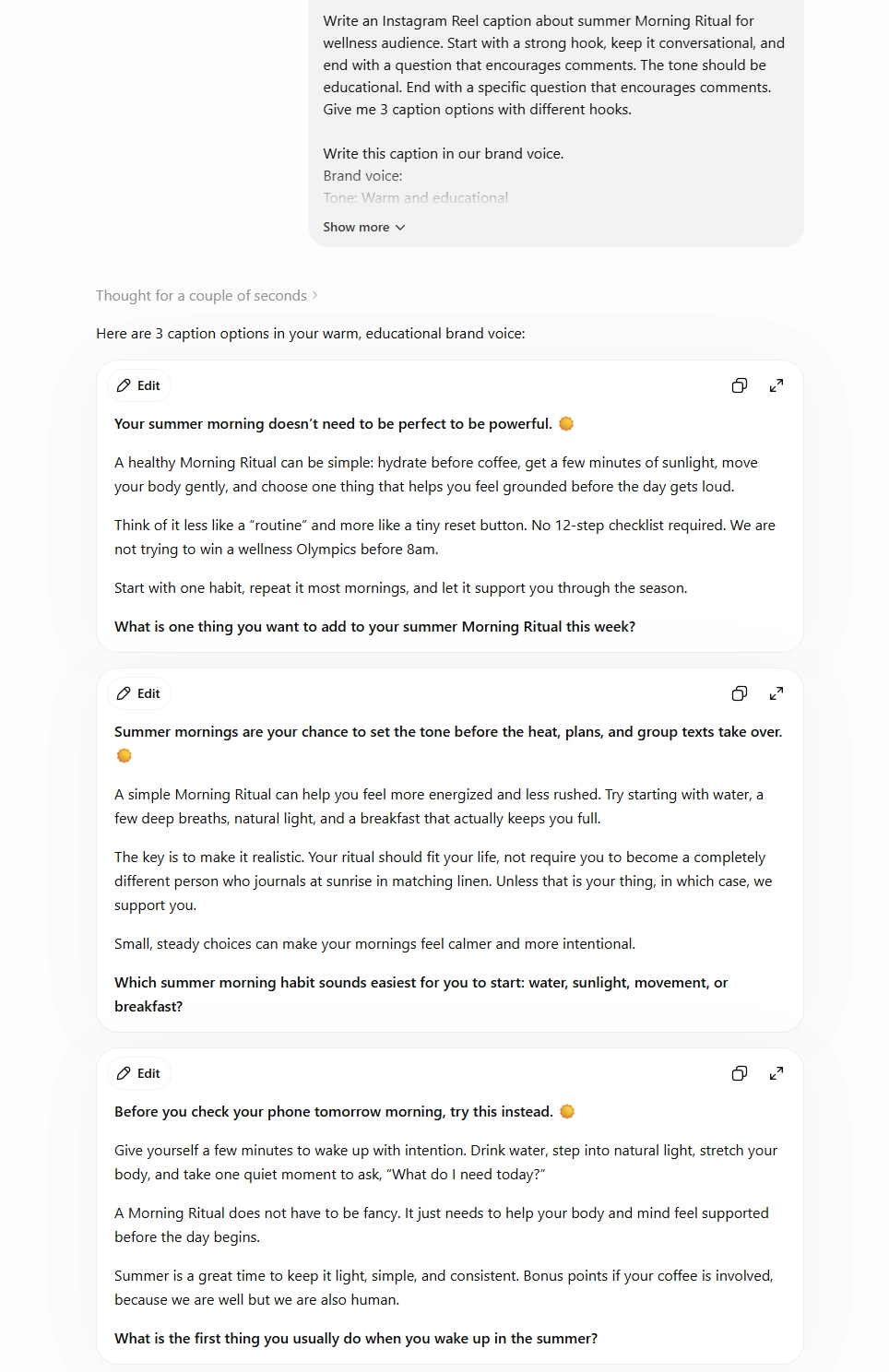
Example 1: Instagram Reel Caption
We asked AI to write a caption for a reel about morning ritual using the prompt share in this blog and adding the details about the brand voice and post context. Make sure you always request to generate multiple options, that way you can visualize different angles to choose and refine the best one. Here's the result:
Example 2: LinkedIn Thought Leadership Caption
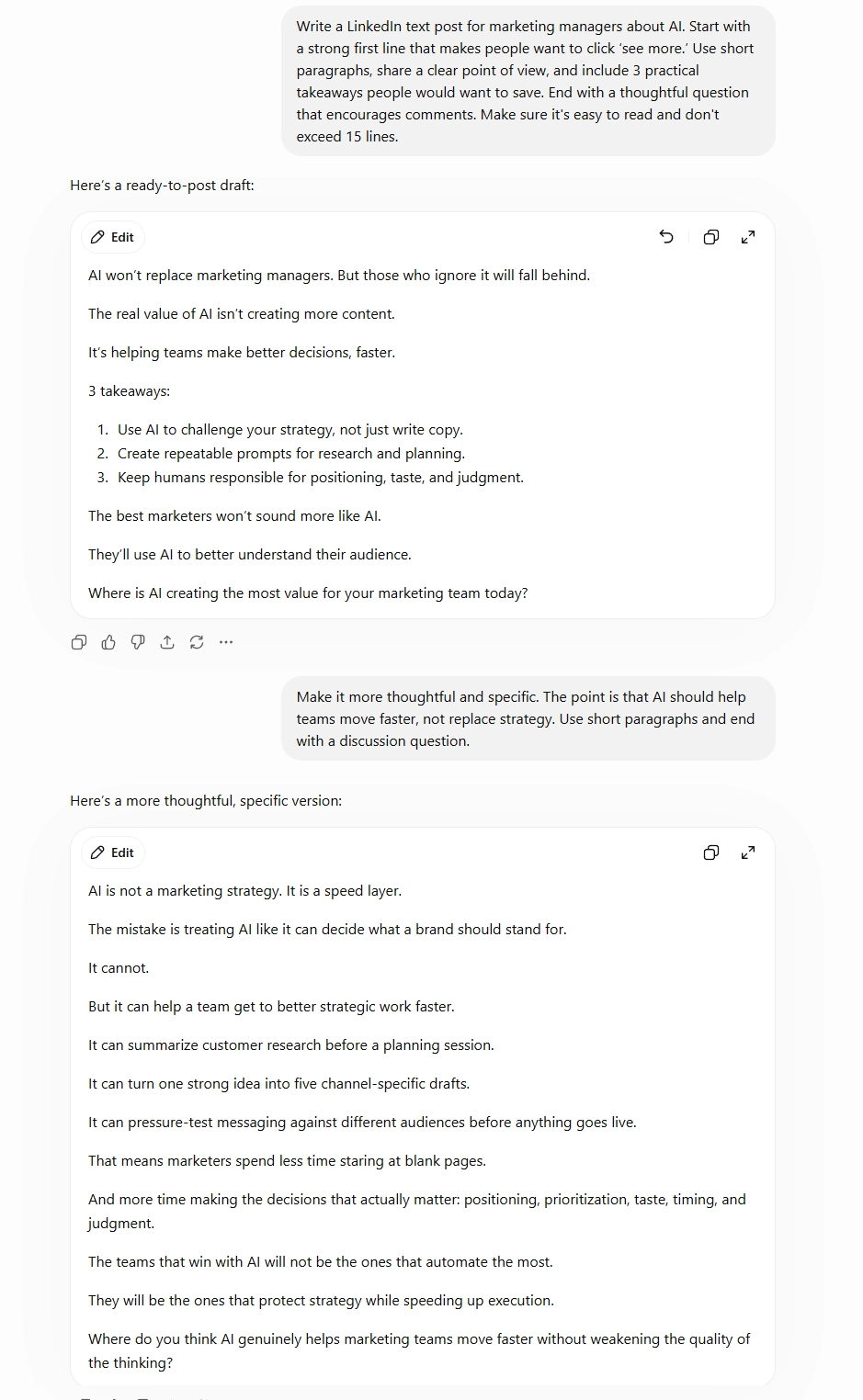
LinkedIn is the perfect place to share thought leadership posts. As we mentioned earlier, the most important thing with AI-generated content is to refine and optimize it for your specific audience, voice, and goals.
In the example below, we used a prompt, then followed up by asking AI to make the post less broad and generic.
Example 3: TikTok Video Caption
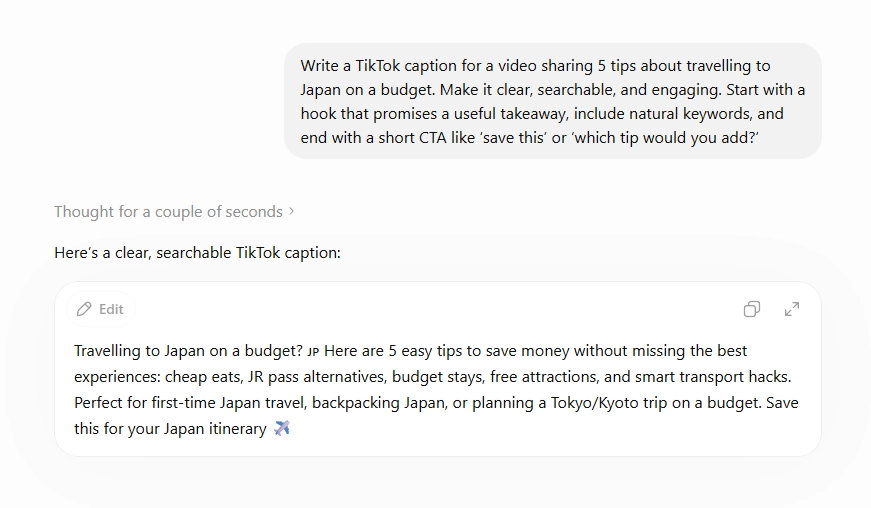
Many users now use TikTok as a search engine, which means your captions need to be searchable. Adding the right keywords can help your videos reach the people actively looking for content like yours.
Here’s an example using the TikTok SEO prompt we shared in this blog:
Example 4: Pinterest product pin caption
Pinterest is a powerful visual discovery engine, and many users visit the platform before making a purchase. That’s why it’s important to make your Pin caption search-friendly by using the right keywords.
You can either add keywords directly to your prompt if you already know them, or ask AI to include relevant keywords naturally.
Here’s an example:
Example 5: X Blog to Threads Caption
X, formerly Twitter, can be a great place not only to share a blog link, but also to repurpose blog ideas into threads. And with AI, this becomes much easier.
See the example below:
Final Thoughts
Using ChatGPT for social media captions can save time, reduce writer’s block, and help you create more caption variations across platforms.
But the best captions still need human direction.
Use it to brainstorm ideas, rewrite drafts, create platform-specific versions, and test new hooks. Then edit the output so it sounds like your brand, speaks to your audience, and supports your goals.
And if you want to create AI social media captions without leaving your scheduling workflow, try Inky inside MeetEdgar. Inky helps you generate captions directly inside Edgar’s content composer, then you can save, publish, or schedule your content from the same place.
Try MeetEdgar free for 30 days →
FAQ: ChatGPT Social Media Captions
Can ChatGPT write social media captions for me?
Yes. ChatGPT can generate captions for Instagram, LinkedIn, TikTok, Twitter/X, Facebook, and Pinterest. The key is giving it a detailed prompt (platform, tone, audience, goal, and format). Without enough context, outputs tend to be generic and require heavy editing.
Can ChatGPT write captions in my brand voice?
Yes, but you need to give it examples. Paste captions you’ve already written, ask ChatGPT to analyze the tone and structure, then use that brand voice guide in future prompts.
Are AI social media captions good for engagement?
AI social media captions can help with engagement if they are specific, relevant, and edited for your audience. The goal is not to publish AI output untouched, but to use it as a starting point for stronger hooks, clearer CTAs, and better variations.
Is ChatGPT better than an AI caption generator?
It depends on your workflow. ChatGPT is useful for brainstorming and rewriting. A built-in AI caption generator like Inky inside MeetEdgar can be more convenient if you want to create captions and schedule posts in the same tool.