In this article
Instead of scrambling to post every single day, imagine spending a few hours creating all your content for the entire month. Then scheduling it to post automatically while you're sleeping, working, or actually enjoying your weekend. Sounds good? That's bulk scheduling! You create everything upfront, set it to post automatically, and and walk away knowing your social media will run smoothly for weeks
In this guide, you'll learn exactly how to bulk schedule social media posts across all major platforms, saving hours each week while maintaining a consistent online presence.
What is bulk social media scheduling?
Bulk social media scheduling is the process of planning, creating, and queuing multiple social media posts at once to be automatically published at predetermined times. Instead of logging into each platform daily to post content manually, you prepare everything in advance during dedicated content creation sessions.
It's like meal prepping for your social media strategy. Just as you might cook a week's worth of meals on a Sunday, bulk scheduling involves creating and scheduling a large volume of posts (for a week, month, or even a quarter) all at once.
But can you actually schedule social media posts in bulk?
Yes!
While native platforms (like Meta Business Suite) allow for some level of scheduling, true bulk scheduling (where you upload 50+ posts in one click) usually requires a third-party Social Media Management tool. Modern tools now support bulk scheduling for everything from static images to short-form videos like Reels and TikToks.
What are the benefits of bulk scheduling?
Beyond the obvious time savings, bulk scheduling offers significant strategic advantages:
Time Efficiency: Instead of spending 20 minutes daily on posting, you can complete a week's (or month's) worth of social media activity in one focused session. This reclaims hours in your schedule and eliminates the mental drain of constant task-switching.
Research shows that task-switching can reduce productivity by up to 40%, so dedicating focused blocks to content creation lets you work faster and with better quality.
Consistent posting schedule: Your audience expects regular content from you. Bulk scheduling ensures you maintain posting consistency even during vacations, busy work periods, or personal emergencies. Consistency builds trust and keeps your brand top-of-mind for followers.
Strategic content planning: When you view an entire month's content at once in a content calendar, you can spot gaps in your messaging, ensure variety in content types, and align posts with marketing campaigns, product launches, or seasonal trends.
Better work-life balance: Instead of feeling chained to your phone to post at optimal times (which might be evenings or weekends), you can schedule content to publish automatically while you're sleeping, spending time with family, or focusing on other business priorities. This means you stay active even when you’re on vacation or focused on other business tasks.
Improved content quality: Batch creation gives you the mental space to focus purely on creativity without the pressure of immediate publishing. You can review, edit, and refine content before scheduling, leading to higher-quality posts.
How to bulk schedule social media posts
Alright, let's get into the actual process. We're breaking this down into two main phases: creating your content and scheduling it.
Phase 1: Preparation – The Batching & Content Creation
Before you start to think about best time to post or scheduling your posts, you need content to get scheduled.
- Step 1: Audit & Analyze
Review your analytics ad look at what's already getting results. Identify what resonates (specific post types, topics, and posting times) and let that data guide your future content. You're basically looking for patterns. If your Tuesday tips posts always do well, make more of those. If nobody cares about your motivational quotes, stop wasting time on them.
- Step 2: Plan Your Calendar
Map out your posts using a tool or spreadsheet. Decide on posting frequency, theme days, and key dates. Plan your content mix (educational, promotional, entertaining) by blocking out topics for each slot.
- Step 3: Batch-Create Content
Produce all content in dedicated batches to maintain focus and quality. Complete all captions in one session, then all graphics, then all videos. This "single-task" method is far more efficient than constant switching.
- Step 4: Organize Your Assets
Save time later by organizing files now. Create clear folders (by month or platform) and use descriptive file names (e.g.,2024-03-15-Instagram-Tip.jpg). For extra clarity, use a master spreadsheet to track posts, dates, platforms, and assets.
- Step 5: Build Your Upload Sheet
For tools that support it, prepare a bulk upload spreadsheet (CSV). Include columns for date, platform, caption, media file, links, and hashtags. Filling this out once saves enormous time versus manual scheduling.
Phase 2: The Scheduling Process
Your content is ready? Now let's get it scheduled.
Step 1) Choose Your Tool
The first step is to choose your tool. You need a tool that'll actually post your content for you.
You've got two main options for scheduling your content: using native platforms built-in schedulers or using a third party tool, and each has its pros and cons. The right tool depends on which platforms you're using and how much automation you want.
Most social platforms now have built-in scheduling features such as Meta Business Suite (Facebook and Instagram), LinkedIn, YouTube Studio and Pinterest.
If you're just managing one or two platforms and posting a few times per week, native schedulers work fine. They're free and straightforward.
But if you're managing 3+ platforms, posting daily, or running multiple accounts, a third-party tool like MeetEdgar will save you hours every week. The time savings alone usually justifies the cost. When administering multiple organizational profiles across these networks, marketing teams typically secure their shared dashboard access by deploying a dedicated password management tool.
Step 2: Upload your content
How you upload depends on which method you chose.
For native schedulers: You'll manually create and schedule each post within the platform. It's straightforward but time-consuming for bulk scheduling.
For third-party tools: This is where your organization really pays off. Most tools offer several upload methods:
- Upload a CSV file with all your content at once
- Drag and drop multiple posts into a calendar
- Build a content library and pull from it
- Connect RSS feeds for automatic blog post sharing
How to Bulk Schedule with MeetEdgar
If you decide to use a third party tool to bulk schedule your social posts, MeetEdgar is particularly great for bulk scheduling and content recycling.
MeetEdgar takes a "set-it-and-forget-it" approach to scheduling by automating your content library. Instead of manually placing each post on a calendar, you assign time slots to content categories, and Edgar automatically posts for you.
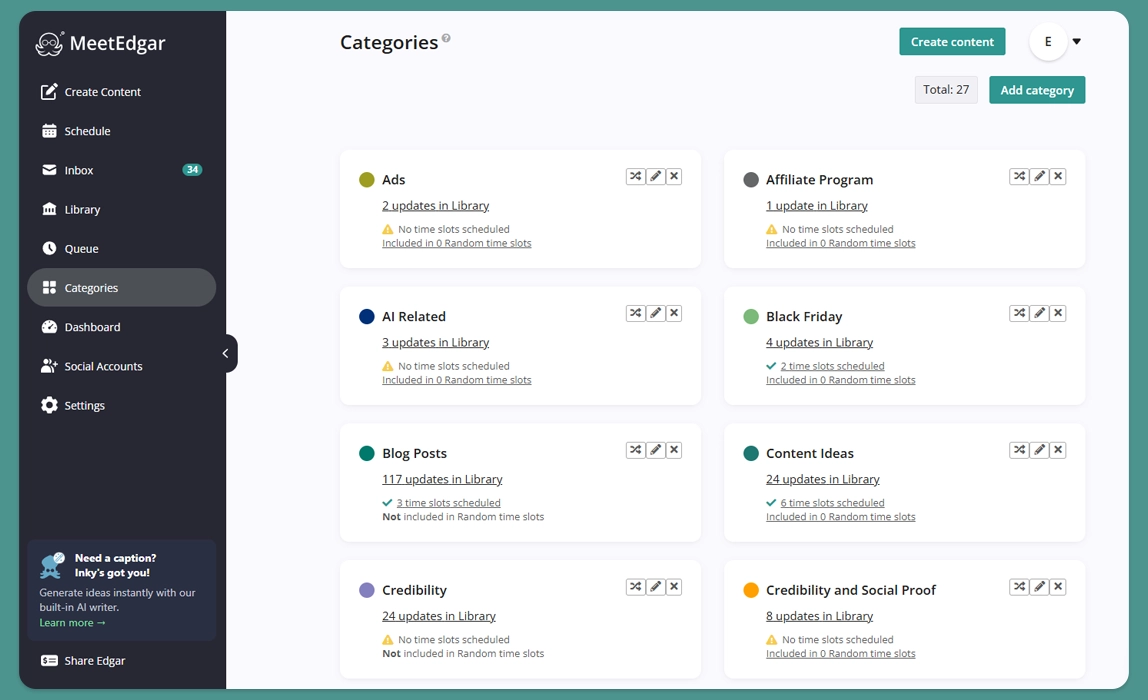
1) Set Up Your Content Categories
Categories are the foundation of automation in MeetEdgar. They help you organize your content (like "Blog Posts," "Tips," or "Promotions") and ensure a balanced mix is shared. Think about the types of content you create and create categories that match your strategy.
2) Add Content to Your Library
You can fill your categories using one of three methods:
Content Composer: Create posts directly in MeetEdgar. You can upload media, write captions, or use its AI assistant, Inky, to generate them. You can also create variations of your content.
Bulk Import via .CSV: Perfect for batch uploading. Prepare a spreadsheet with your quotes, tips, or post copy and upload them all at once to generate dozens of posts in seconds.
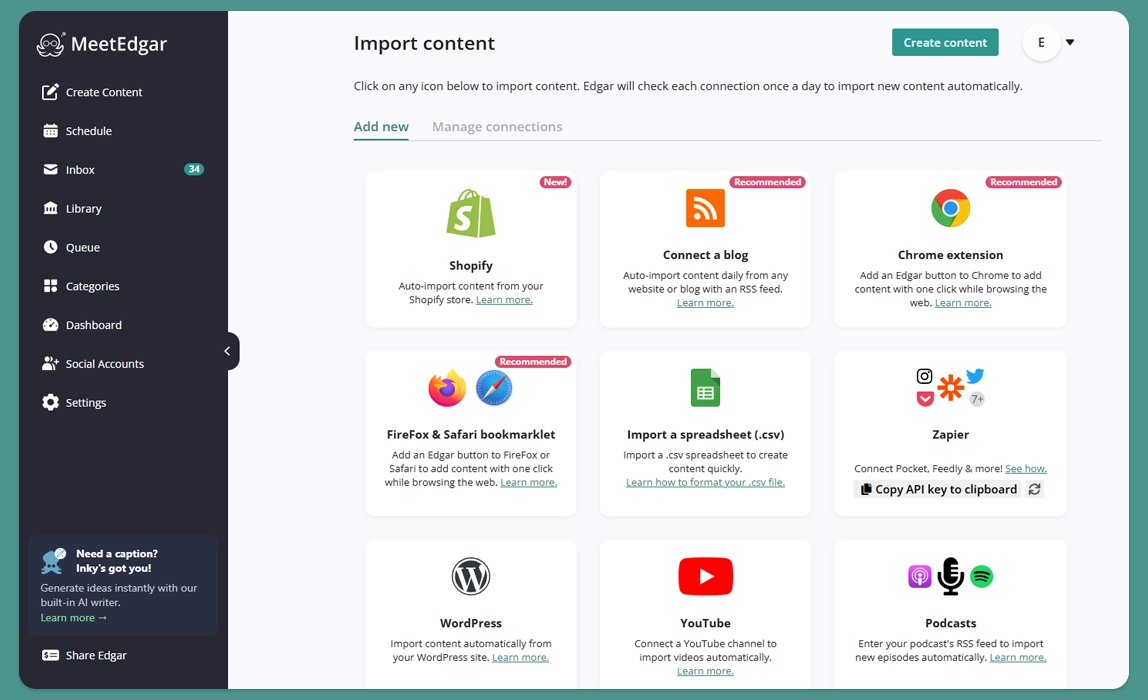
Auto-Import from RSS Feed: Connect your blog's RSS feed. MeetEdgar will automatically pull in new articles and add them to your designated category, keeping your library fresh with minimal effort.
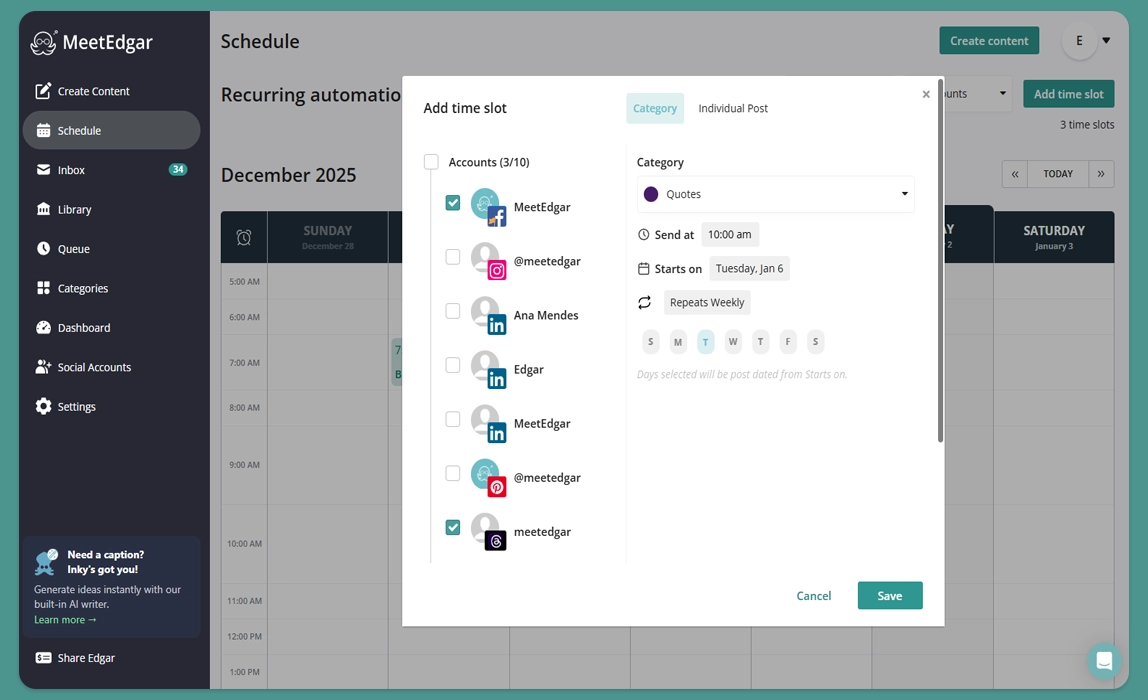
3) Assign Time Slots to Your Categories
This is where the automation happens. In your MeetEdgar calendar, you assign specific days and times to each category
For example, you can set a "Tip Tuesday" slot for your "Tips" category every Tuesday at 10 AM across your X (Formerly Twitter), Threads and LinkedIn.
MeetEdgar will then automatically pull the next post from that category (using a first-in, first-out order) and publish it at the scheduled time. It will even recycle through the category, ensuring you never run out of content.
Bulk Post Scheduling by Platform
Each social media platform approaches scheduling a little differently. Some offer built-in scheduling tools, while others rely more heavily on third-party solutions for bulk workflows.
Bulk post scheduling on Instagram
Instagram allows for native scheduling of Posts and Reels directly within the app or via Meta Business Suite. This works well for planning content in advance, especially when batching a week or two at a time. However, Instagram’s native tools don’t support true bulk uploads via spreadsheets, so most “bulk scheduling” here involves preparing content in advance and scheduling posts one by one. Alternatively, you can use a social media scheduling tool like MeetEdgar to bulk import and schedule Instagram posts.
Bulk post scheduling on Facebook
Facebook scheduling is also handled through Meta Business Suite. It’s efficient for batching posts and viewing everything in a calendar, but like Instagram, it’s designed for individual scheduling rather than large CSV imports.
Bulk post scheduling on LinkedIn
LinkedIn supports native scheduling for both personal profiles and company pages.
When you start a new post on LinkedIn, look for the clock icon at the bottom to choose your date and time and schedule your post.
This makes it easy to plan content ahead, but bulk scheduling usually means drafting multiple posts and scheduling them individually. Teams that manage higher volumes often use third-party tools for faster workflows and collaboration.
Bulk post scheduling on TikTok
If you have a Creator or Business account, TikTok lets you schedule on Desktop. You can only do one video at a time though, which isn't great for bulk scheduling.
For those running a high-frequency video strategy, third-party tools offer more robust bulk-processing features and the ability to manage TikTok alongside other short-form video channels.
Bulk post scheduling on X (formerly Twitter)
X supports scheduled posting depending on account type and interface updates. Many users batch-create tweets and schedule them in one session. Because timelines move quickly, bulk scheduling here is often combined with daily or real-time posting.
Bulk post scheduling on Pinterest
Pinterest business accounts include a “Publish at a later date” option, which works well for batching Pins. Since Pinterest content has a longer lifespan, bulk scheduling is especially effective for maintaining consistent visibility over time.